Fotogrames clau parametritzats - Informe d'estat, setembre 2026
A més de la feina de manteniment i depuració, aquest any el meu treball en el Kdenlive s'ha dedicat principalment a reestructurar el sistema de fotogrames clau del Kdenlive per fer-lo més potent. Això forma part d'una beca NGI Zero Commons via NLnet, vegeu lúltim informe d'estat de febrer per a més context.
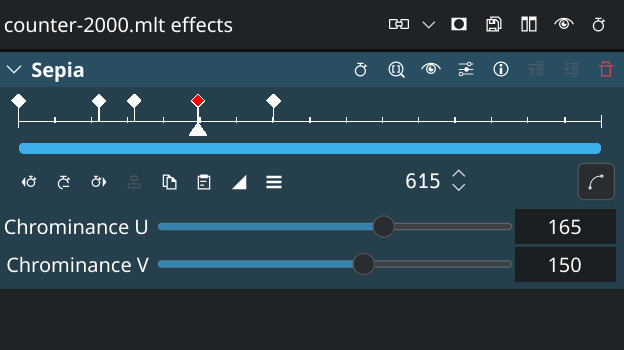
Anteriorment, els fotogrames clau es definien globalment per a un efecte, modificant tots els seus paràmetres. Amb la lògica actualitzada, ara podeu decidir afegir fotogrames clau només a un paràmetre específic, i els paràmetres poden tenir fotogrames clau independents. Aquest treball aviat estarà disponible per a proves, i formarà part del proper llançament del Kdenlive 26.12.0.
Aquest giny nou permet moure fotogrames clau per a diversos efectes en un pas individual i també admet l'escalat de fotogrames clau, el que significa que podeu estirar fàcilment un grup de fotogrames clau.
Effect Stack Before
Effect Stack After Refactoring
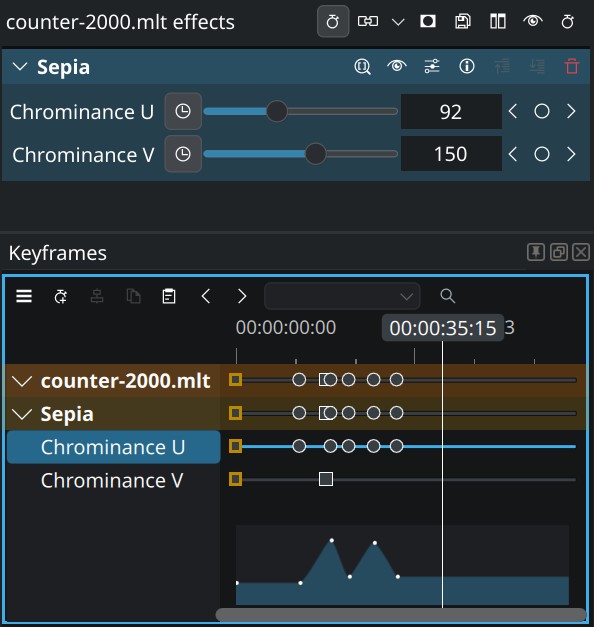
Les característiques bàsiques dels fotogrames clau romanen a la pila d'efectes, com afegir/eliminar un fotograma clau i buscar al fotograma clau anterior/següent, però totes les altres característiques relacionades amb els fotogrames clau s'han eliminat de la pila d'efectes a un plafó dedicat de fotogrames clau. Els valors dels paràmetres ara tenen un fons de color per indicar si esteu en un fotograma clau o no.
Un inconvenient és que utilitza més espai, però tenim previst refinar la interfície en els propers mesos abans del llançament final.
Característiques noves
Més enllà de la possibilitat evident d'afegir fotogrames clau per paràmetre i gestionar fotogrames clau de diversos efectes en un sol lloc, s'han inclòs altres característiques a la reescriptura:
Moure els fotogrames clau amb el teclat
Ara podeu agafar els fotogrames clau seleccionats amb la drecera habitual, i després moure'ls fotograma a fotograma utilitzant les tecles de fletxa.
Zoom i escalat de fotogrames clau
El zoom i el desplaçament es poden utilitzar amb els esdeveniments estàndard de roda del ratolí, i ara és possible escalar els fotogrames clau seleccionant-los i arrossegant amb el modificador Ctrl.
I tota la resta
La interfície de fotogrames clau també permet filtrar paràmetres pel nom per mostrar només els paràmetres coincidents, útil si teniu molts efectes en un clip. Tot aquest treball també farà que sigui molt més fàcil afegir característiques noves de fotogrames clau en el futur.
Rendiment
«Afegir característiques noves és bonic, però què passa amb el rendiment?» us podeu preguntar. Bé, bones notícies: aquest treball també ha implicat algunes millores de neteja i rendiment. Les persones que treballen amb molts fotogrames clau (per exemple amb el seguiment d'objectes) gaudiran realment dels canvis.
Per exemple, si teniu un clip amb més de 1.000 fotogrames clau, gaudireu:
- Temps de càrrega del projecte molt més ràpid (podria er el doble de ràpid)
- Operativa de fotogrames clau molt més ràpida (canviar un valor de fotograma clau abans era molt lent)
- Molt millor velocitat de reproducció quan se selecciona el clip (abans era molt moguda)
I fins i tot si no utilitzeu aquests fotogrames clau, el flux de treball general hauria de ser molt més fluid.
Trobem-nos a l'Akademy

Part de l'equip del Kdenlive estarà a Graz a l'Akademy de KDE, celebrant els 30 anys de KDE. Estigueu-hi per conèixer-nos!
El Kdenlive necessita la vostra col·laboració
El nostre petit equip treballa des de fa anys per a construir un editor de vídeo de codi obert intuïtiu que no us segueixi, no utilitzi les vostres dades i respecti la vostra privadesa. No obstant això, per a assegurar un desenvolupament adequat calen recursos, així que considereu fer una donació si us agrada utilitzar el Kdenlive, fins i tot quantitats petites poden marcar una gran diferència.