תמוניות מפתח לפי משתנים - דוח מצב, ספטמבר 2026
חוץ מעבודה על תחזוקה וניפוי שגיאות, השנה, העבודה שלי על Kdenlive יוחדה במיוחד לשכתוב מערכת תמוניות המפתח של Kdenlive כדי שתהיה יותר עוצמתית. זה חלק ממענק NGI Zero Commons בחסות NLnet, אפשר עיין בדוח המצב האחרון שלי מפברואר כדי לקבל יותר הקשר.
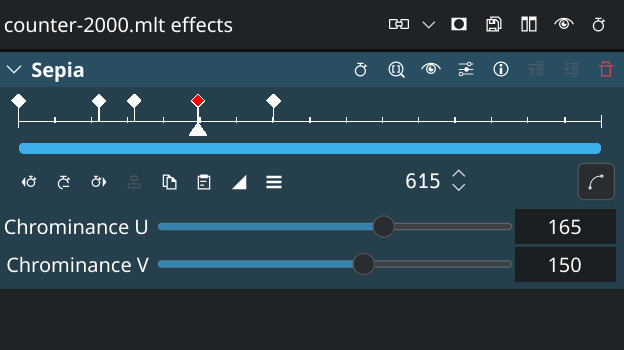
Previously, keyframes were set globally for an effect, touching all its parameters. With the updated logic, you can now decide to add keyframes only to a specific parameter, and parameters can have independant keyframes. This work will soon be made available for testing, and will be part of the next 26.12.0 Kdenlive release.
הווידג׳ט החדש הזה מאפשר לך להעביר תמוניות מפתח למגוון אפקטים בצעד אחד, וגם תומך בהתאמת קנה מידה של תמוניות מפתח, כלומר שאפשר למתוח קבוצה של תמוניות מפתח בקלות.
Effect Stack Before
ערימת אפקטים אחרי השכתוב
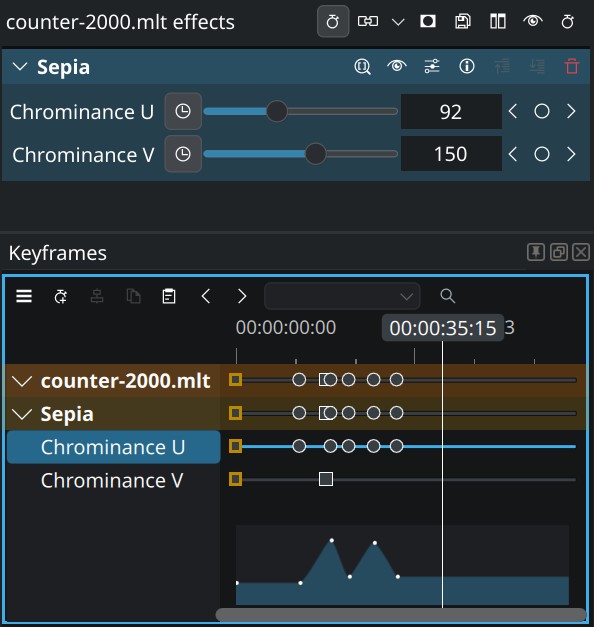
Basic keyframe features remain in the effect stack, like add/remove keyframe and seek to previous/next keyframe, but all other keyframe-related features have otherwise been removed from the effect stack into a dedicated Keyframes panel. The parameter values now have a colored background to indicate if you are currently on a keyframe or not.
אחד החסרונות הוא שהוא משתמש ביותר מקום, אבל אנחנו מתכננים להמשיך ולשפר את הממשק בחודשים הקרובים לפני המהדורה הסופית.
יכולות jsau,
Beyond the obvious possibility to add per-parameter keyframes, and manage keyframes from several effects in one place, a few other features were included in the rewrite:
העברת תמוניות מפתח עם המקלדת
מעתה ניתן לתפוס את תמוניות המפתח הנבחרות עם מקשי הקיצור הרגילים ואז להעביר אותן תמונית אחר תמונית עם מקשי החיצים.
התאמת קנה מידה לתקריב ולתמוניות מפתח
Zooming and scrolling can be used with the standard mouse wheel events, and it is now possible to scale selected keyframes by selecting them and dragging with the Ctrl modifier.
וכל השאר
The Keyframes interface also allows to filter parameters by name to only show matching parameters, useful if you have lots of effects on a clip. All this work will also make it much easier to add new keyframe features in the future.
ביצועים
"Adding new features is nice, but what about performance?" you may ask. Well, good news: this work also involved some cleanup and performance improvements. People working with lots of keyframes (for example with object tracking) will really enjoy the changes.
למשל, אם יש לך סרטון עם למעלה מ־1000 תמוניות מפתח, מצפים לך:
- זמן טעינת המיזמים קצר בהרבה (לפעמים מחצית מהזמן)
- פעולות תמוניות מפתח מהירות בהרבה (שינוי ערך תמונית מפתח היה בעבר איטי מאוד)
- מהירות נגינה טובה בהרבה כאשר סרטון נבחר (בעבר היה מאוד קטוע)
ואפילו בלי הרבה תמוניות מפתח, רצף העבודה הכללים אמור להיות הרבה יותר חלק.
להיפגש איתנו ב־Akademy

חלק מצוות Kdenlive יהיה בגראץ לטובת Akademy של KDE, כדי לציין 30 שנה ל־KDE. נשמח לפגוש אותך שם!
מיזם Kdenlive צריך את התמיכה שלך
הצוות המצומצם שלנו עבד במשך שנים רבות כדי לבנות עורך וידאו נוח בקוד פתוח שלא עוקב אחריך, לא משתמש במידע שלך ומכבד את הפרטיות שלך. בנוסף לאמור, כדי לפתח כראוי צריך משאבים, לכן אנו צריכים את עזרתך בתרומה אם השימוש ב־Kdenlive עושה לך נעים - אפילו סכומים קטנים עושים שינוי גדול.