Kdenlive 0.7.5 released
We are glad to announce the release of Kdenlive version 0.7.5. A new version of MLT (0.4.4) was also released today, all users are encouraged to upgrade to these new versions.
For this release, we concentrated on bug fixing and we hope that users will feel more comfortable with Kdenlive as it becomes more stable.
You can find more informations on the new feature below page.
A complete changelog of the fixed issues can be found on our bugtracker.
As usual, you can download the Kdenlive sources from our sourceforge page (see compilation instructions), updated packages for your distros should be available in a few days.
We are also glad to see that the Kdenlive community is growing, so feel free to contribute, either by helping translations, contributing a video tutorial, reporting bugs or helping each other in our forums.
For the Kdenlive team:
Jean-Baptiste Mardelle
Changes
For this release, we mostly focused on bug fixes and stability issues to improve the user experience. Previous versions of the 0.7.x releases had frequent timeline corruption issues and hopefully those should be fixed now.
You can see a full changelog of the fixed bugs on our bugtracker
A new release of MLT (version 0.4.4) was also released today and we encourage all users to upgrade.
Main changes
- Timeline vertical zoom (make tracks smaller or larger in one click)
- Stability improvement (fix issues with clip and group move / delete)
- Non realtime playing in monitors, allows to see your editing frame by frame
- Keyframe editor for effects
- Template text clips
- Improved titler (allow for right / bottom alignment of objects), allow unicode characters
- New dialog reporting missing clips when opening a project
- Save a copy of the Project Profile in Kdenlive document to make it easier to work on another computer
- Save last used Rendering Profile in document so it appears by default when reopening
- Rewrote and improved the thumbnail creator (that creates preview thumbs for your project file for KDE's file managers)
- And of course a lot of other bug fixes
Vertical timeline zoom
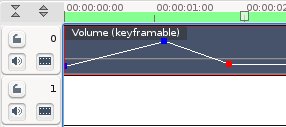
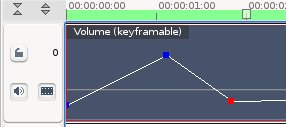
This will allow you to adjust your effects more precisely, or zoom out to see all your tracks.
Template title clips
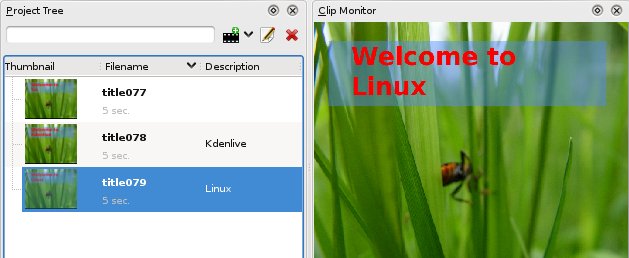
To make use of this feature, you must first create a normal title, then save it (using the "save" icon in titler toolbar). In this title clip, put a text block containing the string "%s".
Then, go to the "Project" menu, "Add Template Title":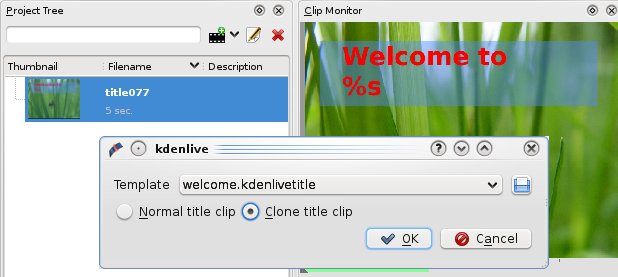
In this example I created 2 template clips (using the "Clone title clip" option). Then, you just need to double click in the "Description" column of the template clips, enter your text and it will appear in the monitor.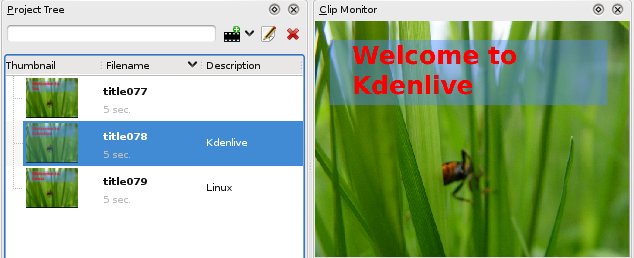
Unicode input
Unicode values can be inserted via the icon
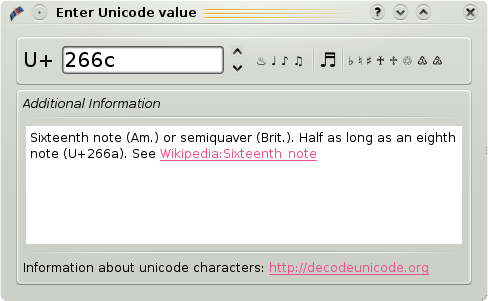
Most unicode characters can be found on decodeunicode.org. If you’ve got a few special characters which are not on your keyboard. Take a note of their value, e.g. on a piece of paper, and you won’t need to copy/paste a single character anymore :)
Keyframe Editor
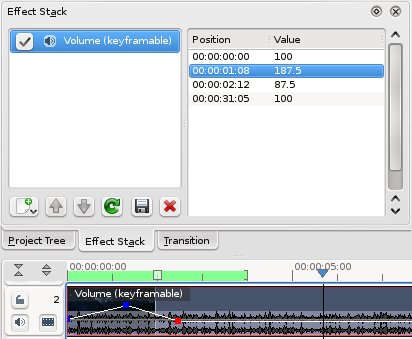
Manually adjust your effects keyframes (for example to adjust audio volume).
Jean-Baptiste Mardelle and the Kdenlive team.