Помогите протестировать Kdenlive
Разработка Kdenlive к выпуску 26.12 идёт полным ходом, и нам нужны отзывы о двух готовящихся нововведениях.
Редактор титров
Первое из них касается редактора титров. Наш редактор титров всегда был работоспособным, но довольно ограниченным. Недавно klg реализовал возможность использовать разные начертания шрифта в одном текстовом блоке.
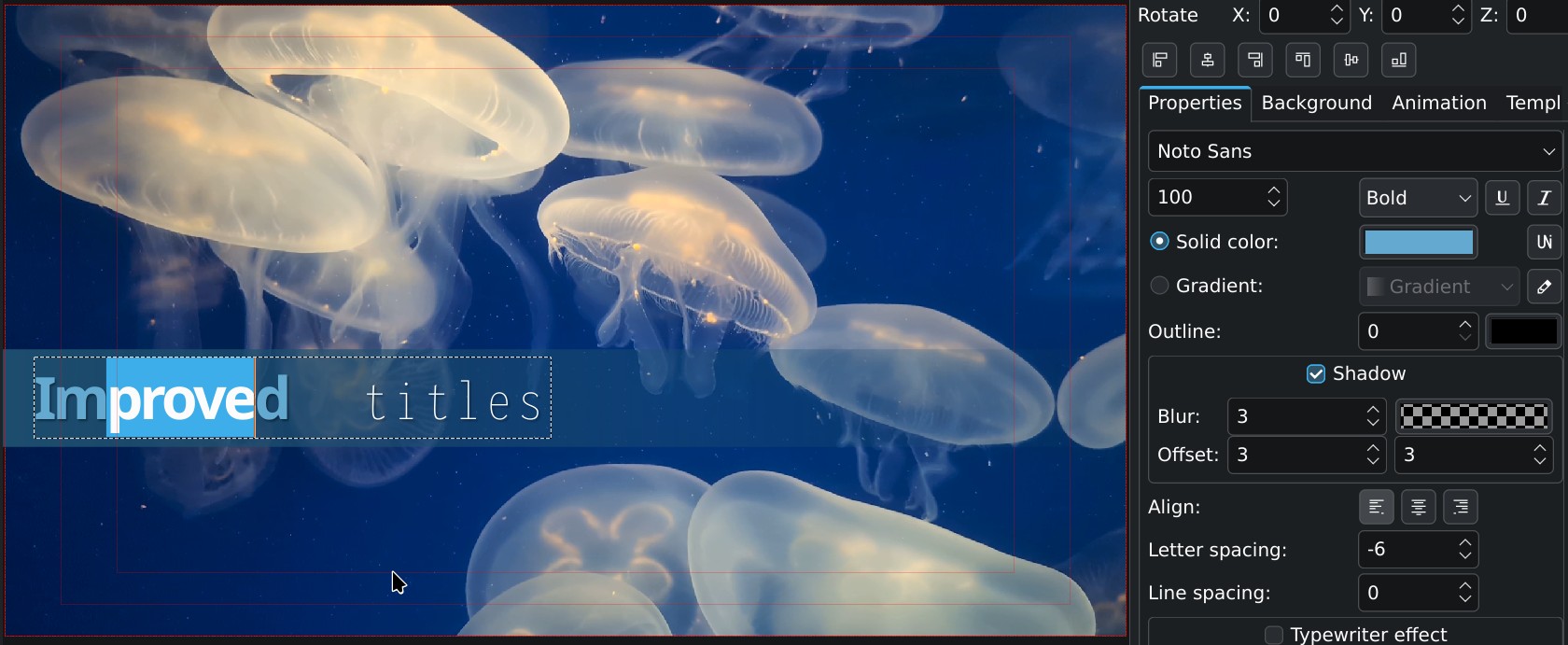
Другие участники тоже внесли несколько отличных улучшений, например поддержку отмены и повтора действий (реализовал Jaimukund Bhan) и поддержку копирования и вставки (реализовал chocolate image).
Относительные пути в проектах
Второе крупное изменение — переход на относительные пути в файлах проектов. Если видео или изображения лежат в той же папке, что и файл проекта (или во вложенной папке), работу можно легко перенести на другой диск и открыть без проблем. Это заметно облегчит жизнь тем, кто монтирует проекты на нескольких компьютерах или переключается между разными операционными системами. Заодно это должно устранить проблемы у команд, которые совместно работают над проектами на сетевых или съёмных дисках.
Как можно помочь
Конечно, мы провели регрессионное тестирование, и для обоих нововведений есть модульные тесты, но некоторые реальные сценарии могут быть не охвачены, поэтому отзывы тестировщиков для нас очень ценны. Загрузите сборки по ссылкам ниже, выполните в этой версии для разработчиков (26.11.70) описанные далее шаги и сообщите о результатах в комментариях.
Проверка изменений в редакторе титров
Цель — убедиться, что существующие титры показываются в точности как раньше, а их положение и атрибуты не изменились.
- Откройте файлы своих проектов и убедитесь, что существующие титры правильно показываются и собираются.
- Сохраните проект в новый файл, откройте его снова и убедитесь, что всё по-прежнему правильно показывается и собирается.
Проверка относительных путей
Цель — убедиться, что все файлы в существующих проектах находятся правильно, что проект можно собрать, сохранить и снова открыть, и все файлы по-прежнему находятся.
- Откройте свои проекты и убедитесь, что все файлы на месте.
- Проверьте в параметрах проекта, что
папка проектаопределена правильно (расположение по умолчанию, родительская папка или пользовательская папка). - Проверьте, что сборка работает правильно (нет пропавших изображений или видео).
- Сохраните проект под новым именем («Сохранить как»), затем повторите шаги 1–3.
- Если вы иногда монтируете на нескольких компьютерах, сохраните проект под новым именем и убедитесь, что файл проекта правильно открывается и сохраняется на разных компьютерах.
Загрузка

Экспериментальные сборки
Эти сборки предназначены только для тестирования, не используйте их в рабочих проектах.Не рекомендуем сохранять в этой версии существующие проекты поверх старых файлов.
После тестирования снова установите стабильную версию.
AppImage для Linux можно загрузить из папки нестабильных сборок Kdenlive. Перед запуском сделайте файл исполняемым в диспетчере файлов.
Установщик для Windows можно загрузить из папки нестабильных сборок Kdenlive.
Разрабатываемую версию в формате Flatpak можно установить с CDN-сервера KDE.