Kdenlive’ı sınamamıza yardım edin
Kdenlive’ın 26.12 sürümüne yönelik geliştirme çalışmaları oldukça yoğun bir şekilde sürüyor; bu kapsamda, gelecek özelliklerden ikisiyle ilgili görüşlerinizi almak istiyoruz.
Başlık Düzenleyicisi
Özelliklerden biri, başlık düzenleyicisi ile ilgili. Başlık düzenleyicimiz her zaman işlevsel olsa da oldukça sınırlıydı. Kısa süre önce klg tarafından, tek bir metin bloğu içinde farklı yazıtipi stillerinin kullanılmasına olanak tanıyan yeni bir özellik eklendi.
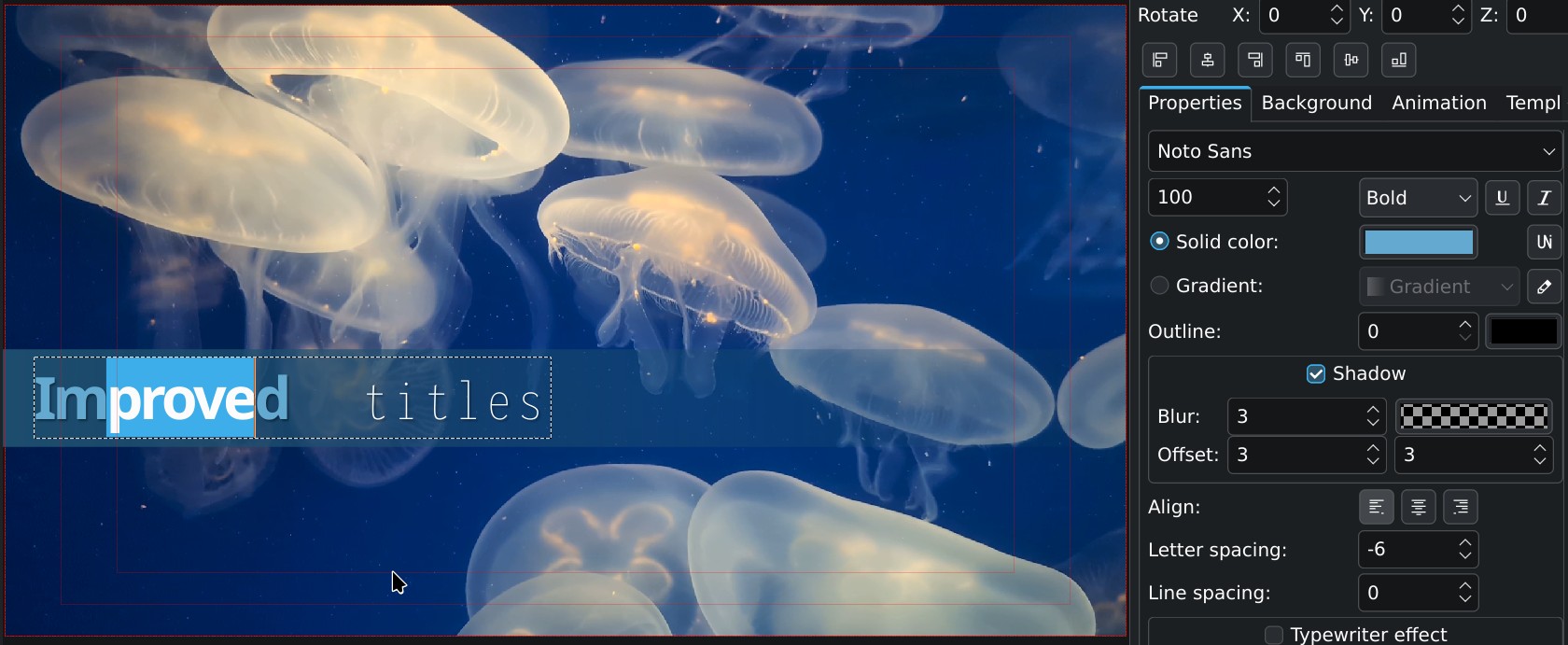
Diğer katkıda bulunanlar tarafından başka önemli iyileştirmeler de yapıldığını belirtmek gerekir; örneğin Jaimukund Bhan tarafından uygulanan geri al/yinele desteği ve chocolate image tarafından uygulanan kopyala/yapıştır desteği bunlardan bazılarıdır.
Projeler için göreceli yollar
İkinci büyük değişiklik, proje dosyalarında göreceli yollara geçiştir. Bu, videolarınızın veya görsellerinizin proje dosyasıyla aynı klasörde (veya bir alt klasörde) bulunması durumunda, çalışmanızı başka bir sürücüye kolayca taşıyıp hiçbir sorun yaşamadan yeniden açabileceğiniz anlamına gelir. Bu durum, projeleri birden fazla bilgisayarda düzenleyen veya farklı işletim sistemleri arasında geçiş yapan kullanıcılar için deneyimi önemli ölçüde iyileştirecektir. Ayrıca bu değişiklik, ağ sürücüleri veya taşınabilir sürücüler üzerindeki projelerle iş birliği içinde çalışan ekiplerin yaşadığı sorunları da çözecektir.
Nasıl yardım edebilirsiniz
Elbette, her iki yeni özellik için de gerileme testleri gerçekleştirdik ve birim testleri hazırladık; ancak gerçek hayat senaryolarının tamamı kapsanmamış olabilir. Bu nedenle, test uzmanlarından gelecek geri bildirimler bizim için büyük değer taşıyor. Aşağıdaki bağlantıdan ikili dosyaları indirip bu geliştirme sürümünü (26.11.70) kullanarak, aşağıda açıklanan adımları sınayın ve elde ettiğiniz sonuçları yorumlar kısmında paylaşın.
Başlık düzenleyicisi değişikliklerini sınamak için
Amaç, var olan başlıkların tıpkı daha önce olduğu gibi görünmesini sağlamak ve bu başlıkların konumunda ya da niteliklerinde herhangi bir değişiklik olmamasını temin etmektir.
- Proje dosyalarınızı açın; var olan başlıklarınızın doğru şekilde görüntülendiğinden ve işlendiğinden emin olun.
- Projenizi yeni bir dosyaya kaydedin, ardından dosyayı yeniden açmayı deneyin ve düzgün bir şekilde görüntülenip işlendiğinden emin olun.
Göreceli yollar değişikliklerini sınamak için
Amaç, var olan projelerdeki tüm dosyaların doğru bir şekilde bulunmasını sağlamak; ayrıca görüntü alma işlemi yapıp dosyayı kaydettiğinizde ve yeniden açtığınızda, tüm dosyaların hâlâ doğru bir şekilde bulunabilmesini temin etmektir.
- Projelerinizi açın, tüm dosyaların doğru bir şekilde göründüğünden emin olun.
- Proje ayarlarında
proje klasörünün(öntanımlı konum, üst klasör veya özel bir klasör olarak) doğru şekilde algılandığını denetleyin. - Görselleştirmenin düzgün çalıştığından (eksik görsel veya video bulunmadığından) emin olun.
- Projeyi yeni bir adla kaydedin (Farklı Kaydet), ardından 1’den 3’e kadar olan adımları yineleyin.
- Bazen birden fazla bilgisayardan düzenleme yapıyorsanız projeyi yeni bir adla kaydedin ve proje dosyasını farklı bilgisayarlarınızdan sorunsuz bir şekilde açıp kaydedebildiğinizden emin olun.
İndir

Deneysel Yapılar
Bu indirmeler yalnızca sınama amaçlıdır; lütfen bunları canlıda kullanmayın.Var olan projelerinizin üzerine, bu sürümle kaydederek yazmamanızı öneririz.
Sınama işlemlerini tamamladıktan sonra kararlı bir sürümü yeniden kurun.
Linux AppImage dosyası, Kdenlive’ın kararsız yayım indirme klasöründen indirilebilir. Çalıştırmadan önce dosya yöneticiniz üzerinden dosyayı yürütülebilir hâle getirin.
Windows kurulum programı, Kdenlive kararsız yayım indirme klasöründen indirilebilir.
Geliştirme amaçlı Flatpak yapısı, KDE’nin CDN sunucusundan indirilebilir.