跳到內容
Kdenlive 標誌,包含三角形「播放」圖示、一個時間軸游標,與許多不同長度的線,類似視訊軌道或音訊波形。

Kdenlive

Kdenlive 是 KDE Non-Linear Video Editor(KDE 非線性影片編輯器)的縮寫。它支援 Linux、Windows、macOS 與 BSD。

下載
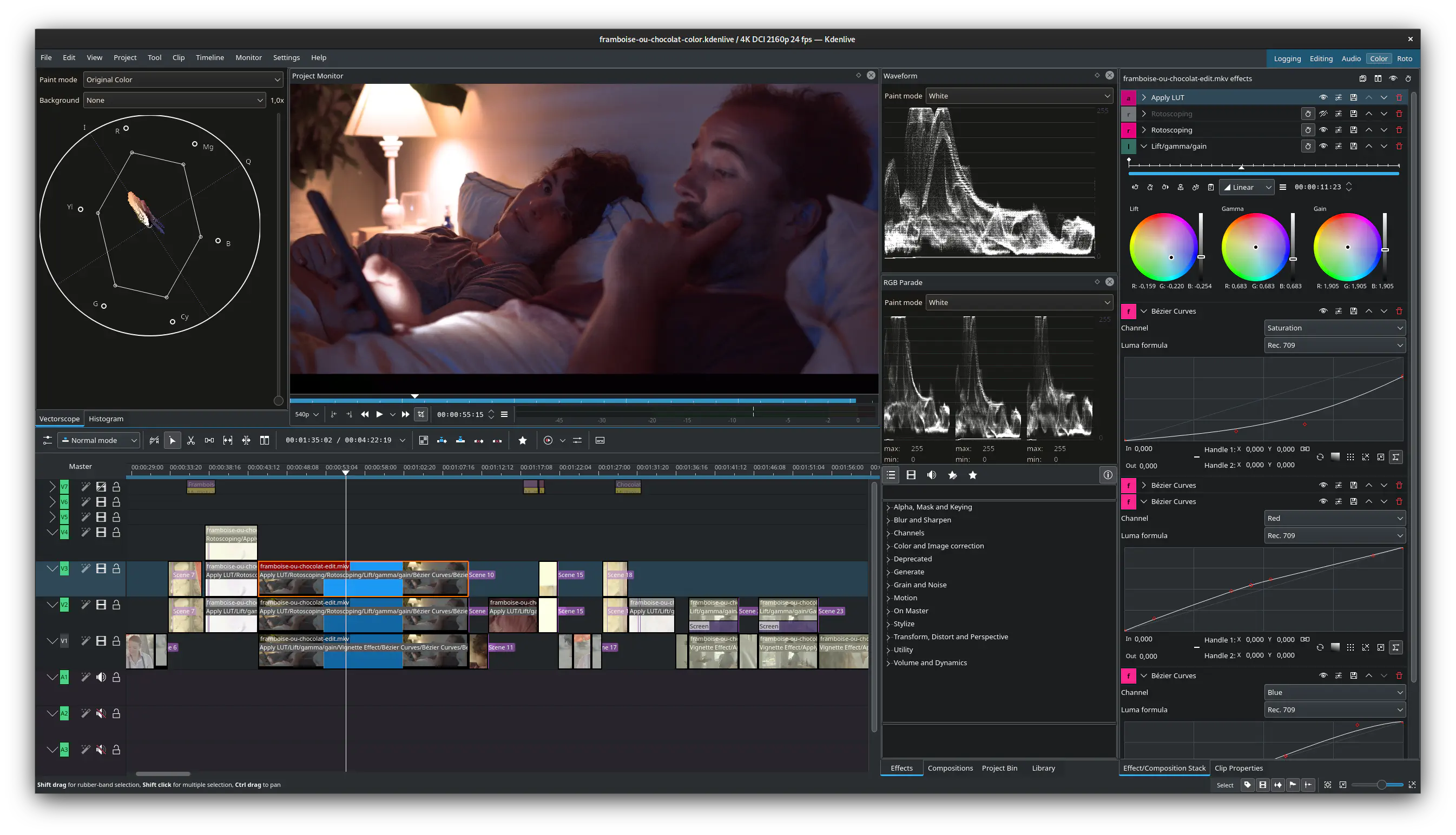
Screenshot of Kdenlive used to edit Framboise ou chocolat, by François Téchené

最新消息

Kdenlive 播放頭標誌,下方寫著版本編號「26.08.1」。
2026 年 9 月 11 日,星期五

Kdenlive 26.08.1 已釋出

Kdenlive 播放頭標誌,下方寫著版本編號「26.08.0」。
2026 年 8 月 31 日,星期一

Kdenlive 26.08.0 已釋出

Powerful Tools from Start to Finish

Whether you're doing simple edits or crafting a professional masterpiece, Kdenlive supports you from ingest to the final touch, with a customizable interface that adapts to your workflow.
Screenshots collage of Kdenlive widgets related to asset management.

Asset Management

Ingest footage in almost any audio or video format, review its metadata or use proxies for smooth playback even on low-end systems.

Use powerful tags and filters to organize your assets and create multiple bins, so everything is at hand when you need it.

Screenshots collage of Kdenlive widgets related to timeline ediding.

Editing

Take control of your edit with a flexible non-linear workflow, multicam and 3-point editing. Manage complex timelines with nested sequences and markers while automatic backups keep your work protected.
Screenshots collage of Kdenlive widgets related to audio.

Audio

Can you hear the difference? Shape your soundtrack with powerful mixers, built-in voiceover recording, and an audio spectrum that lets you see exactly what you’re hearing.
Screenshots collage of Kdenlive widgets related to effects and transitions.

Effects and Transitions

Choose from hundreds of audio and video effects, apply them at any level of your workflow and create dynamic changes with keyframes.

Add smooth transitions between clips and combine layers with flexible compositions to create polished, dynamic sequences.

Screenshots collage of Kdenlive widgets related to video colors.

Color

Bring your footage to life! Apply LUTs, do basic color corrections or detailed creative grading.

Analyze your image with histogram, vectorscope, RGB parade and waveform to make precise adjustments.

Screenshots collage of Kdenlive widgets related to subtitles and text on videos.

Subtitles and Text

Create professional subtitles with automatic transcription, advanced layering and styling.

Add simple title clips with ease or seamlessly connect your project to Glaxnimate for complex motion graphics.

Wait, there is more!

使用者手冊

A Creative Community

Kdenlive is part of the KDE Community and developed by a small, mostly volunteer team from all over the world.

Kdenlive 的故事 參與 支援